Restarting nodes
Since we store the graph checkpoints we can recover from various errors without having to re-do the computations from scratch.
In the case we want to re-run a node that has failed for an ephemeral reason then it is enough to invalidate that single node.
However if a node has written outputs but those outputs are incorrect for some reason then the workflow will continue and many dependent nodes may be run with incorrect inputs.
In these cases the method storage.restart_task may be useful.
It will find all of the dependent nodes that have run and invalidate these also.
This means that the chosen node will get restarted and all the subsequent nodes that depend upon it will be run again with new inputs.
from uuid import UUID

from data.typed_eval import typed_eval
from tierkreis.consts import WORKERS_DIR
from tierkreis.executor import UvExecutor
from tierkreis.storage import FileStorage

from tierkreis import run_graph

storage = FileStorage(UUID(int=205), "restart_example", do_cleanup=True)
executor = UvExecutor(WORKERS_DIR, storage.logs_path)
run_graph(storage, executor, typed_eval(), {})
If we open the workflow in the visualiser then we should see something like the following
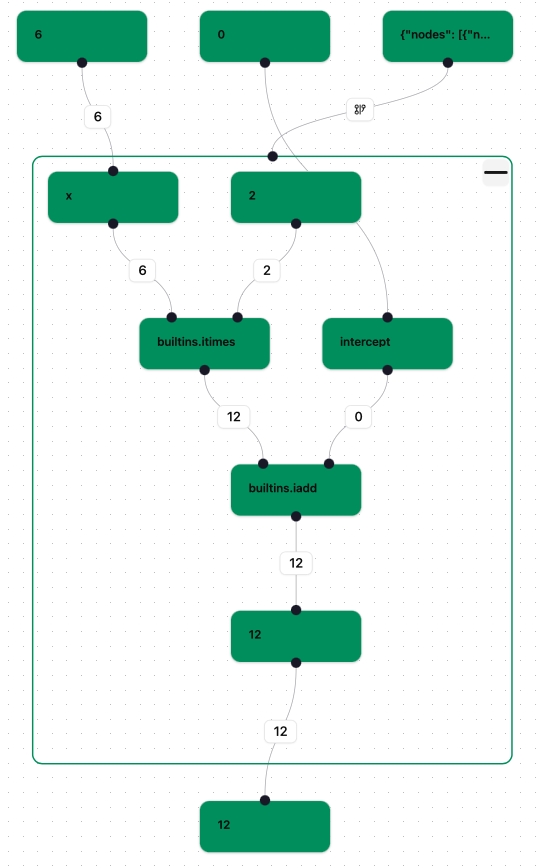
which shows that all the nodes have finished.
Next we restart the task labelled “builtins.itimes” with the following code. (Alternatively we can click on the node in the visualiser and press the ‘Restart’ button.)
from tierkreis.controller import resume_graph
from tierkreis.controller.data.location import Loc

storage.restart_task(Loc().N(3).N(3))
['-.N3.N5', '-.N3.N4', '-.N4']
If we open the workflow in the visualiser again then we should see something like the following
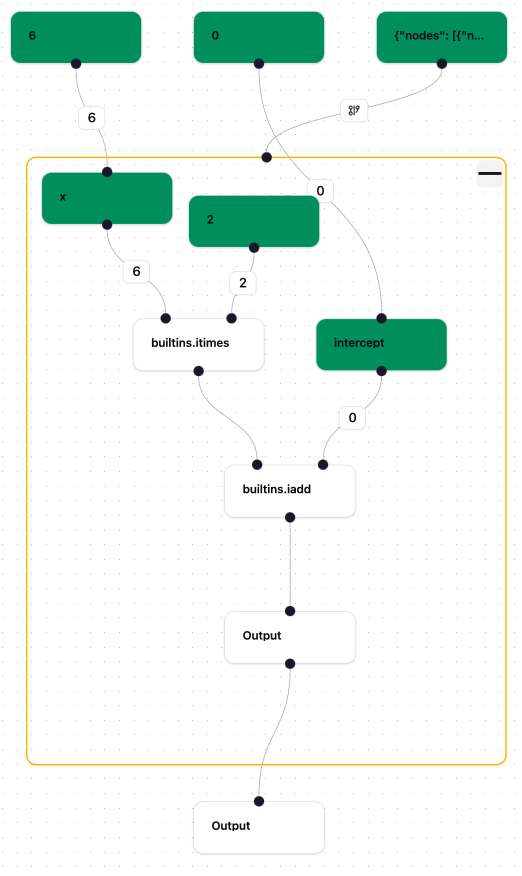
which shows that the chosen node has been restarted as well as all the nodes dependent on it.
Next we resume graph execution to complete all the invalidated nodes:
resume_graph(storage, executor)
The graph now shows as completed again, as in the first screenshot.